
The YAML you already know
services, build, image, ports, environment, depends_on — same fields, same structure. If you’ve written a docker-compose.yml, you can write a banyan.yaml.






banyan-cli dashboard —web — monitor your cluster from the browser
You know Docker Compose. You write a docker-compose.yml, run docker compose up, and it works — on one machine.
Then you need more. More servers, more replicas, more availability. The usual next step involves weeks of learning, dozens of new concepts, and infrastructure that’s heavier than your application.
Banyan takes a different approach. Same YAML syntax you already write, distributed across your servers. No new language to learn. No templating. No 50-page getting started guide.
name: my-app
services:  caddy:    image: caddy:latest    command: caddy reverse-proxy --from example.com --to api:8080    deploy:      placement:        node: gateway-*       # ← pin to your public-facing servers    ports:      - "80:80"      - "443:443"
  api:    build: ./api    deploy:      replicas: 3             # ← scale what you need      autoscale:        min: 2        max: 10        target_cpu: 70        # ← or let Banyan scale for you    ports:      - "8080:8080"    environment:      - DB_HOST=db
  db:    image: postgres:15-alpine
Same services, build, ports, environment you already know from Docker Compose. Add deploy.replicas to scale, deploy.placement.node to pin services to specific servers. One command to deploy: banyan-cli up -f banyan.yaml.
The YAML you already know
services, build, image, ports, environment, depends_on — same fields, same structure. If you’ve written a docker-compose.yml, you can write a banyan.yaml.
Three binaries, nothing else
banyan-engine, banyan-agent, banyan-cli. No package managers, no plugins, no Helm charts, no YAML templating. Download, run, deploy.
Built-in image registry
Use build: in your manifest and Banyan builds, stores, and distributes images across your cluster. No Docker Hub account needed. No private registry to configure.
Containers talk across servers
Services on different machines communicate as if they were on the same network. All traffic is encrypted with WireGuard. Banyan sets up the overlay network and DNS automatically.
Built-in monitoring
banyan-cli dashboard --web opens a live web dashboard in your browser — cluster overview, agent metrics, container status, log viewer, and command palette. Prefer the terminal? banyan-cli dashboard gives you the same data as a TUI. Both are built into the CLI. No Grafana setup, no separate server — monitoring is one command away.
Self-healing deployments
Container crashes? Restarted automatically based on your restart: policy. Server dies? Work rescheduled to healthy servers within minutes. Banyan checks reality against your manifest every 10 seconds and repairs any drift.
Auto-scaling built in
Define target_cpu in your manifest and Banyan scales replicas automatically. Scale up under load, scale down when idle. Graceful drain prevents dropped requests. Or scale manually with banyan-cli scale my-app api=5.
Encrypted secrets
banyan-cli secret create DB_PASSWORD — encrypted at rest, injected into containers as env vars. No plaintext in manifests or source control. No external Vault to set up.
High availability
Run multiple engines for zero-downtime control plane. All engines are active — no leader election, no manual failover. Start with one engine, add more when you need them.
Open source, self-hosted
Apache 2.0. Inspect the code, modify it, run it on your own servers. No vendor lock-in, no usage-based pricing.
Teams who’ve outgrown a single server but don’t need — or don’t want — Kubernetes.
Banyan handles the orchestration so you can focus on the software you’re building.
| Platform | Architecture | Status |
|---|---|---|
 Linux (Ubuntu, Debian, Pop!_OS, Mint, RHEL, Fedora, Rocky) Linux (Ubuntu, Debian, Pop!_OS, Mint, RHEL, Fedora, Rocky) | x86_64, ARM64 | ✅ Supported |
 macOS macOS | 🔜 Coming soon | |
 Windows Windows | ❌ Not planned |
One-time setup on each machine:
# Control planesudo banyan-engine initsudo systemctl enable --now banyan-engine
# Each agentsudo banyan-agent initsudo systemctl enable --now banyan-agent
# Your deploy machine (no sudo after init)sudo banyan-cli init
Then deploy — every time, one command:
banyan-cli up -f banyan.yamlThree focused binaries — engine, agent, and CLI. No package managers. No plugins.
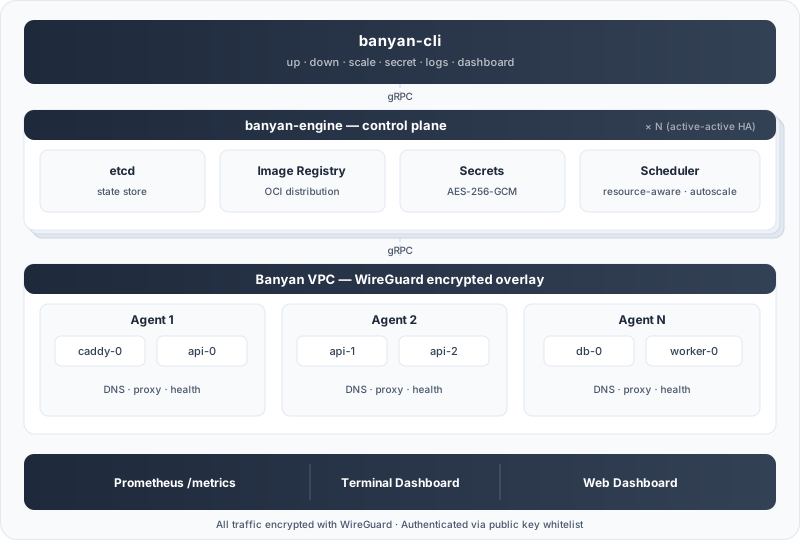
The CLI sends your manifest to the Engine, which stores state in etcd, manages encrypted secrets, and schedules containers across Agents (with auto-scaling). A reconciliation loop checks every 10 seconds that reality matches your manifest — crashed containers are restarted, dead agents get their work rescheduled. Each Agent runs containerd and pulls images from the Engine’s built-in registry. All communication is encrypted with WireGuard. For high availability, run multiple engines — they coordinate automatically.